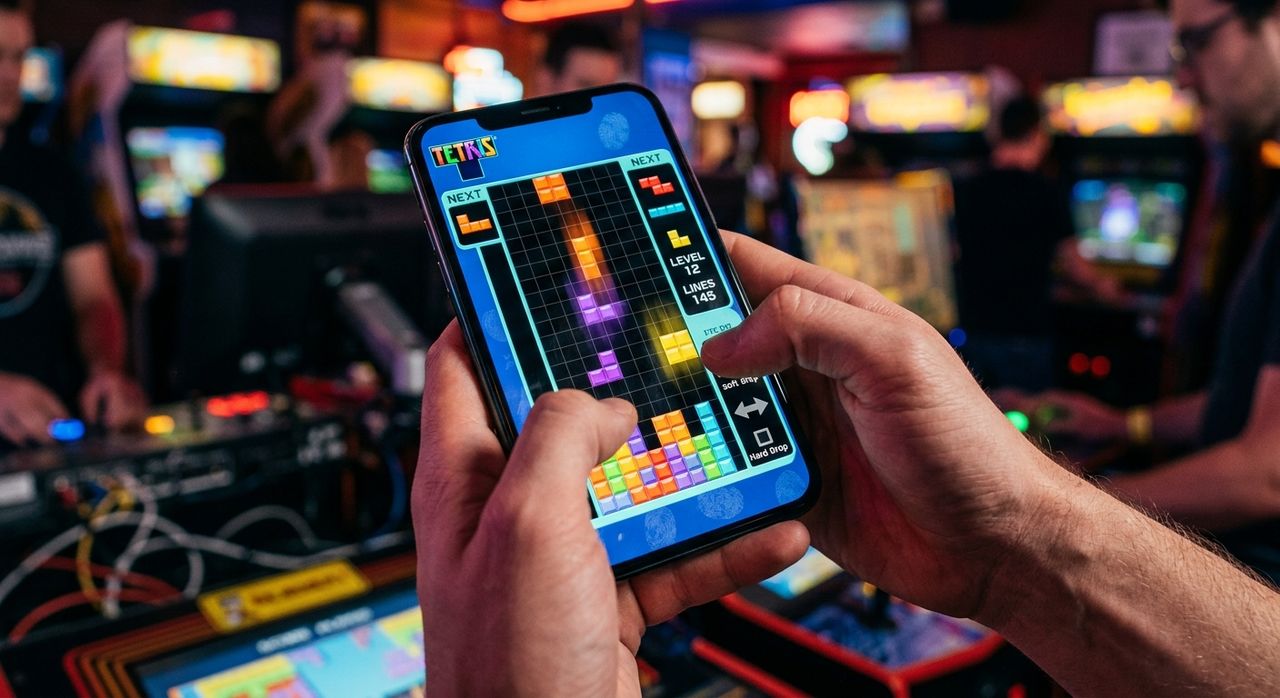
Walk into any busy phone shop in Singapore and watch what a seasoned buyer does with a display unit. They skip the camera app. They ignore the sticker on the box. Instead, they open Tetris, play for about 90 seconds, and put the phone back down. That ritual is not random. It is one of the most reliable ways to judge whether a touchscreen actually responds the way your fingers expect it to, and it costs nothing but a minute of your time.
Key Takeaways
- Experienced phone buyers use Tetris as a live touchscreen lag test before committing to a purchase.
- Sprint Mode, where you clear 40 lines as fast as possible, is the purest speed benchmark a touchscreen can face.
- High-rotation moves like the t-spin demand split-second precision that immediately exposes input latency issues.
- A global leaderboard shows just how competitive mobile Tetris has become across every phone price tier.
- This test applies equally to budget 5G models and flagship foldables, giving you real tactile feedback before you buy.
The Feeling That Spec Sheets Cannot Describe
Every phone listing on Gridmobile.com.sg comes packed with specifications. Display type, refresh rate, chipset, RAM. Those numbers matter. But none of them fully tell you whether a touchscreen responds the way your fingers expect.
There is a concept called touch latency. It is the time gap between your finger making contact with the glass and the device registering the input. A display running at 120Hz can still have poor touch latency if the digitizer firmware is sluggish. The two metrics are related, but they are not identical, and spec sheets rarely publish touch latency in a way that is easy to compare across brands.
This is precisely where Tetris fills the gap. The game demands fast, repeated, and precise taps and swipes. It punishes delay instantly and visibly. When a piece does not rotate when you expect it to, you feel it in your gut. No spreadsheet required.
Why Tetris Specifically Became the Go-To Stress Test
Tetris is among the most widely played games in history. Its origins and global spread trace back to a Soviet computer lab in 1984, and the game has appeared on virtually every platform ever made since. That ubiquity is exactly what makes it so useful as a testing tool.
Most people already have a feel for how Tetris should play. That familiarity is the secret weapon. Because players instinctively recognize good Tetris control, any deviation from that standard registers immediately. A sticky rotation here. A delayed swipe that sends a piece flying in the wrong direction. These are not abstract complaints. They are physical sensations that experienced players notice within seconds of picking up a new device.
Other games could theoretically serve the same purpose. But Tetris has specific qualities that suit it perfectly. The inputs are simple but fast. There is no story or visual distraction pulling attention away from the controls. The feedback loop is almost instant: your piece either lands where you intended, or it does not. That makes it a remarkably clean diagnostic instrument that anyone can use without instructions.
Sprint Mode Is the Purest Benchmark You Can Run on a Phone
Of all the Tetris formats available, playing sprint mode puts the most sustained pressure on a touchscreen. The objective is to clear 40 lines in the shortest possible time. That sounds simple. In practice, it means hammering inputs at a pace that exposes any weakness in the digitizer chain almost immediately.
Here is what makes this format so revealing as a practical test:
- Continuous, relentless input pressure. Unlike casual play where you might pause between pieces, clearing 40 lines fast demands constant rapid tapping. The screen never gets a break, which means any latency becomes visible fast.
- No margin for delay. Sprint records are measured in seconds and fractions of seconds. A sluggish screen forces corrective moves that cost time. A responsive one lets you place pieces cleanly without backtracking or misdrops.
- A standardized, repeatable task. Everyone is doing the exact same thing: 40 lines, as fast as possible. That makes it genuinely easy to compare performance across different devices side by side.
- Self-paced intensity. A beginner can run it slowly to test basic responsiveness. An advanced player can push speed to stress-test the screen at higher input frequencies. The test scales with your skill level.
- Fast repeatability in-store. Each run takes two to five minutes for most players. You can try a phone twice, get a consistent read, and move on without spending half an hour standing next to a display stand.
A phone that feels perfectly fine during casual scrolling can still stutter under intense Tetris play. Sprint mode draws that difference out in the open, clearly and immediately, before you hand over any money.
Why High-Rotation Moves Reveal What Casual Play Misses
Basic Tetris play only scratches the surface of what a touchscreen can handle. To really push the limits, you need moves that demand both speed and rotational precision at the same moment. That is where mastering the t-spin technique becomes genuinely useful for diagnosing a phone before you buy it.
A t-spin involves rotating a T-shaped piece into a tight gap at the last moment, clearing lines that would otherwise seem impossible to fill. Executing it correctly demands a precise sequence of rotations, often under real time pressure. If a phone's digitizer is even slightly delayed, the rotation either does not register in time or fires too late. The move fails, and you lose the line clear.
At that point it is not about player skill. It is about whether the phone can keep up with fast, deliberate input sequences. The t-spin is a controlled and repeatable action. If you can land it consistently on a given phone, that phone's touch response is genuinely good. If it misfires more often than it should, the screen is giving you a clear answer about its own limitations.
For buyers who want to know how a phone will handle fast typing, photo editing with precise gestures, or any app that rewards tight tap accuracy, this kind of test gives real data. Not theoretical data from a benchmark app. Actual tactile feedback from the device in your hands, under realistic conditions.
The Competitive Scene That Puts Your Score in Context
Tetris has grown into a serious competitive hobby, and the gap between a good score and a great one often comes down directly to the quality of the device being used. Scanning the global tetris leaderboard gives you a sense of the performance ceiling that top players are chasing, and it puts casual phone-test results into useful perspective.
Top sprint times are achieved by players who have refined their input technique to a near-mechanical level of precision. Those times are only achievable on screens that respond fast and accurately. Anything less and the scores simply cannot be reached, regardless of how skilled the player is. The screen becomes the bottleneck.
This makes the leaderboard useful beyond pure competition. It sets a concrete, human benchmark for what great touchscreen responsiveness actually enables in practice. If a phone cannot get you anywhere near a reasonable sprint time during a warm-up run, the gap is probably the screen, not you.
How Different Phone Tiers Hold Up Under the Tetris Test
The test does not treat all phones equally, and the differences across price tiers are worth understanding before committing to a purchase. The table below captures the general pattern that consistent real-world testing tends to surface.
Touchscreen Performance Across Phone Price Tiers
| Phone Tier | Typical Touch Sampling | Tetris Test Behaviour | Buyer Takeaway |
|---|---|---|---|
| Entry-level 5G | 60Hz display, 120Hz touch | Occasional delay on fast rotations | Fine for casual play; noticeable lag under sprint pressure |
| Mid-range | 90-120Hz display, 240Hz touch | Generally smooth with minor hesitation at peak speed | Good all-round choice for most buyers and everyday gaming |
| Premium flagship | 120Hz LTPO, 360Hz+ touch | Responsive and consistent across all game speeds | Closest to the precision competitive players prefer on mobile |
| Flagship foldable | 120Hz dual screens, high touch rate | Varies by mode; outer screen often tighter than the inner panel | Test both screen modes before deciding which you prefer |
The pattern is consistent across brands. Higher touch sampling rates produce better Tetris performance. But hardware alone is not the complete picture. Software optimization matters just as much. Some budget phones with well-tuned firmware outperform mid-range models that have faster specs on paper but poor touch processing pipelines. The Tetris test catches those exceptions that a spec comparison never would.
Running Your Own Touchscreen Audit at the Store
You do not need to be a competitive player to use this method. You just need a few minutes and a clear sense of what to look for.
Open Tetris on the display unit and give yourself about 30 seconds to get comfortable with the controls on that particular device. Then push the pace deliberately. Try to move pieces across the board fast. Attempt a few rapid rotations in quick succession. Notice whether pieces respond exactly when you tap or whether there is a slight delay before they react. Pay attention to whether swipes register cleanly or occasionally trigger twice.
If the phone passes that informal check without frustrating you, the touchscreen is likely good enough for daily use. If you notice hesitation during even moderate input speeds, that is a warning worth heeding. Fast typing, swiping through feeds, and precise gaming all rely on the same underlying touch pipeline that Tetris is putting under pressure.
This method was born from practical experience on countless store floors, not from marketing materials or sponsored content. It gives you information that a spec comparison cannot. And it takes less time than reading a full review while standing next to a display stand.
A Classic Game That Earns a Permanent Spot in Every Phone Aisle
Tetris became the unofficial touchscreen benchmark because it was already everywhere, players already knew what it should feel like, and the feedback was immediate and brutally honest. That combination turned a decades-old puzzle game into a diagnostic tool that any buyer can use with zero technical background and zero special equipment.
The next time you are weighing up a new phone in a Singapore store, trust your fingers as much as the spec sheet. A two-minute game in the store might save you months of subtle frustration with a screen that never quite responds the way you expect. The blocks do not lie, and they never have.